
Custom API
Import customer content from your own tools with source-scoped API keys.
Connect your customer portal, feedback system, or other tool to Sift. Custom API imports private conversations and starts Sift analysis. Imported conversations use normal action statuses. Moderators can claim, tag, and change their status. Sift cannot send replies to these conversations.
At a glance
| Import customer content | ✅ Single items or batches |
| Author information, channels, and tags | ✅ |
| Registered item and author fields | ✅ Map fields before importing |
| Stable IDs and exact retries | ✅ |
| Analysis and receipt tracking | ✅ |
| Import key access | Selected sources only |
| Batch size | Up to 100 items and 1 MiB |
| Outbound replies or attachments | ❌ Text intake only |
What you're looking at
Open Settings → Connections → Integrations → Custom API. Each source represents an external system. Its three tabs guide setup:
| Tab | Use |
|---|---|
| Setup | Open API keys, configure the source, channels, and tags. Copy the endpoint and try an item. |
| Fields | Map producer field names to registered Sift item or author fields. Fields that a batch agent writes are not offered. |
| Activity | Track receipts, check analysis, and open stored conversations. |
The flow is: Source → Import key → Validate → Import → Receipt → Sift analysis.
Set it up
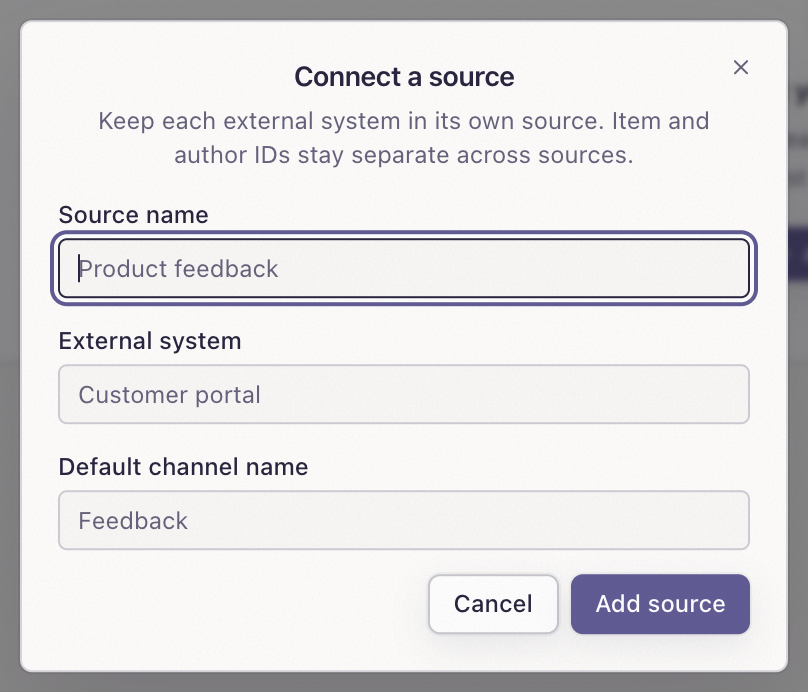
- Select Add source. Enter a source name. The default channel name is optional and defaults to the source name.
- In Setup, add channels or source tags if needed. Keep the channel with external ID
default. - In Fields, map custom fields before sending them.
- In API keys, create an Import key. The default selects this source and a 90-day expiry.
- Copy the secret once. Store it in your tool's secret store.
- Copy the endpoint from Setup.
Organization admins manage sources and keys. Use one source per external system. Item and author IDs stay separate across sources.
Choose the right key
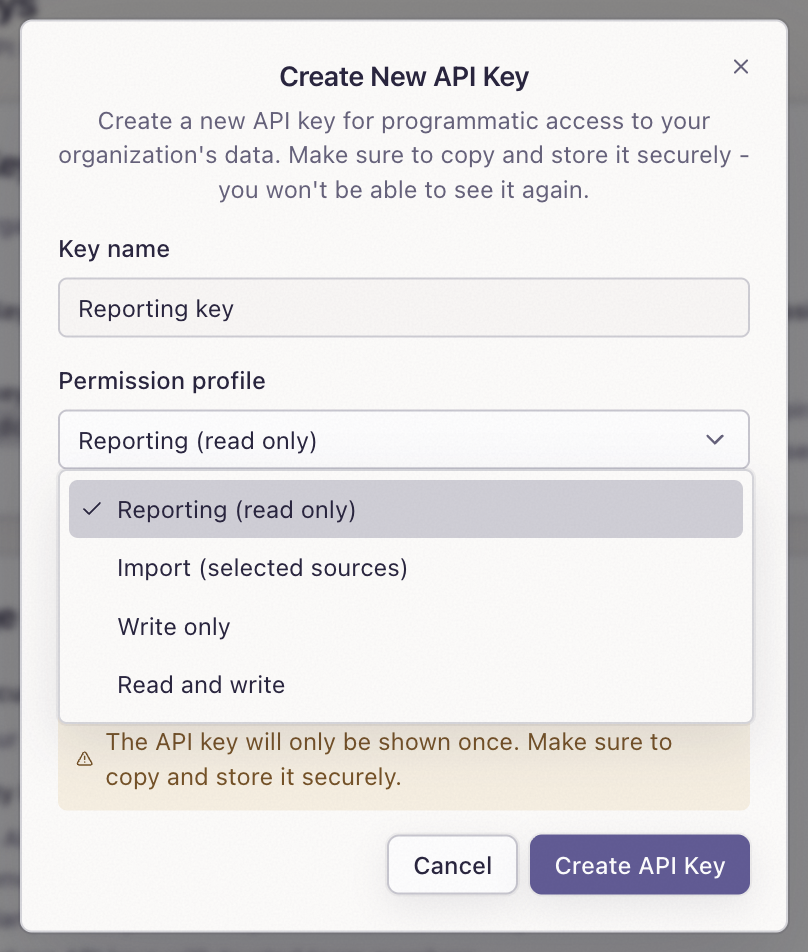
| Profile | Access |
|---|---|
| Import | Validate, import, correct items, retry failed intake, and read receipts for selected sources. Scopes: ingest, ingest:read. |
| Reporting | Read reporting data. No intake or receipt access. Scope: read. |
| Write | General API writes. No Custom API intake. Scope: write. |
| Read and write | General reads and writes. No Custom API intake. Scopes: read, write. |
Use separate keys for ingestion and reporting. Expiry options are 30 days, 90 days, or no expiry. Revocation blocks new requests.
Send an item
Save this example as item.json. Replace the example values with your content.
{
  "externalId": "feedback-184",
  "text": "Please add CSV export for feedback.",
  "occurredAt": "2026-10-12T09:00:00Z",
  "author": {
    "externalId": "customer-73",
    "name": "Maya Chen"
  }
}
Set SIFT_API_BASE to https://api.getsift.ai, SIFT_SOURCE_ID to your source ID, and SIFT_IMPORT_KEY to your Import key. Then send:
curl --fail-with-body -X POST \
  "$SIFT_API_BASE/v0/sources/$SIFT_SOURCE_ID/items" \
  -H "X-API-Key: $SIFT_IMPORT_KEY" \
  -H "Content-Type: application/json" \
  --data-binary @item.json
For staging, use https://api.staging.getsift.ai. Keep staging and production sources and keys separate.
Required fields are externalId, text, occurredAt, author.externalId, and author.name. Use a stable item ID from your system. No platform message ID is required. Use the original event time in ISO format with Z or a timezone offset.
Try an item in Setup validates JSON before import. API validation uses POST /v0/sources/{sourceId}/items/validate with an items array. Validation does not store content or start analysis.
A successful import returns HTTP 202 and a receipts array. Save the receipt ID, item ID, revision, and status. Acceptance does not mean analysis is complete.
Channels, tags, and custom fields
| Optional field | Use |
|---|---|
channelExternalId | A configured channel ID. Defaults to default. |
title, sourceUrl | An optional title and HTTPS link to the original item. |
author.username, author.email | Optional username and valid email address. |
author.avatarUrl, author.profileUrl | Optional HTTPS URLs. |
customFields, author.customFields | Values for mapped, registered Sift fields. |
metadata, author.metadata | JSON context. Metadata does not create report fields. |
tagIds | Up to 32 existing Sift tag IDs from your organization. Use IDs, not names. |
A source supports up to 50 channels. Source tags and channel tags can filter imported conversations.
Map producer keys to registered fields under Fields. For example, map plan to an author field, then send "customFields": {"plan": "Pro"} inside author. Unmapped keys are rejected. Human edits and verified item fields stay protected.
Threads and replies
For a standalone item, omit thread and parent IDs. For a thread root, set threadExternalId to its own externalId. For a reply, send the root ID as threadExternalId and the immediate parent ID as parentExternalId.
Import roots first. A reply cannot be its own parent or root. A reply received before its root can show waiting_for_root.
Track processing
Open Activity, or read recent receipts with GET /v0/sources/{sourceId}/receipts?limit=50. The limit is 1–100; the default is 50.
| Intake status | Meaning |
|---|---|
accepted | A durable receipt is reserved. |
processing | Intake work is running. |
waiting_for_root | Import the matching thread root. |
stored | Content is stored. Check analysis separately. |
failed | Fix the cause, then retry the receipt. |
superseded | A newer revision replaces this pending work. |
Stored receipts show current conversation analysis as complete, pending, skipped, or unavailable. Open conversation opens the imported conversation. Analysis describes the current record, not a specific receipt revision.
The recent-receipts response includes recordId, analysisStatus, and url. Read one intake receipt with GET /v0/sources/{sourceId}/receipts/{receiptId}. This single-receipt response does not include analysis status.
Sift uses its existing analysis pipeline for imported content, including generated titles, summaries, and sentiment. Processing takes time. If Search shows no results, include the original occurredAt date in its range.
Batches, retries, and corrections
Send {"items": [...]} to POST /v0/sources/{sourceId}/items/batch. Use distinct item IDs. Each item has a 100 KiB limit and text supports up to 64,000 characters. Custom field and metadata objects allow 64 keys and six nested levels. Split batches that exceed 100 items or 1 MiB.
If an import times out, resend the same item ID and content. An exact retry returns the original receipt. Changed content under the same ID conflicts. Retry failed intake with POST /v0/sources/{sourceId}/receipts/{receiptId}/retry. Pending or completed work cannot be retried this way.
To correct content, send PATCH /v0/sources/{sourceId}/items/{externalId}:
{
  "expectedRevision": 1,
  "requestId": "7192cdcb-c9d4-4cf4-8c37-d09d8a2ff715",
  "text": "Please add CSV export with dates."
}
Use the latest receipt revision and a new UUID for each correction. For a network retry, reuse the same UUID and body. Corrections can change text, title, item custom fields, or metadata. Identity, original time, author, channel, and thread stay unchanged. Custom field and metadata objects replace the corresponding objects; include values you want to retain.
Troubleshooting
| Problem | Action |
|---|---|
| Invalid or expired key | Check expiry and revocation. Replace the key if needed. |
| Missing scope | Use an Import key for intake and receipts. |
| Source not found | Check the source ID and the key's allowed sources. |
| Invalid item or unknown channel | Check required fields, JSON types, channels, and field mappings. Validate again. |
| Conflict | Keep retry content unchanged. Use the latest revision for a correction. |
| Source paused or archived | Resume a paused source before importing. Archived sources block new items. |
| Analysis pending or unavailable | Refresh Activity. If the state persists, contact your administrator. |
Pause blocks new imports and corrections. Archive retains stored conversations and receipts.
Tips
- Keep item and author IDs stable. URL-encode IDs in route paths.
- Save request bodies and receipt IDs so you can retry safely.
- Do not put keys in browser code, logs, or source control.
- Use the original timestamp rather than the time you send the request.